Book a flight — Cleartrip UX flow
Search Cleartrip flights, choose an itinerary and fare, and review optional trip protection and add-ons. Enter traveller details and review the trip before choosing a payment method.
Step 1: Choose Flights

Home · Logo, Button, Card, Illustration, Badge, Promo banner
Step 2: Review flight search
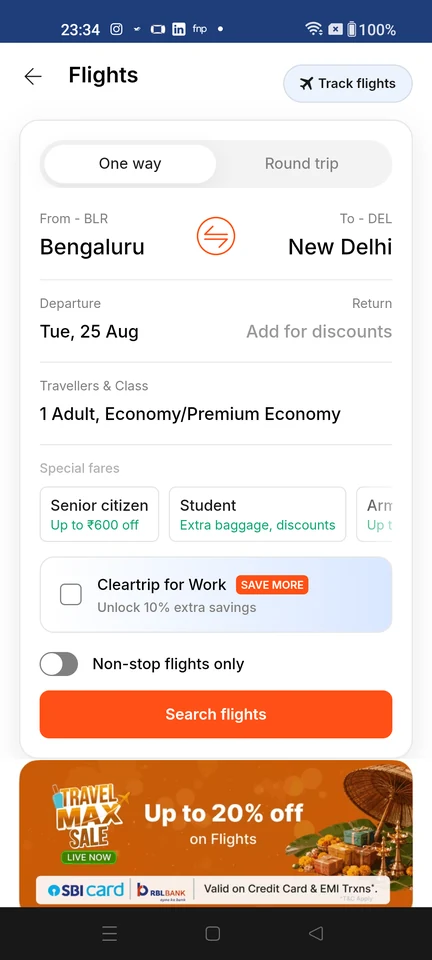
Booking form · Top bar, Button, Segmented control, Select, Card, Checkbox
Step 3: Choose a flight
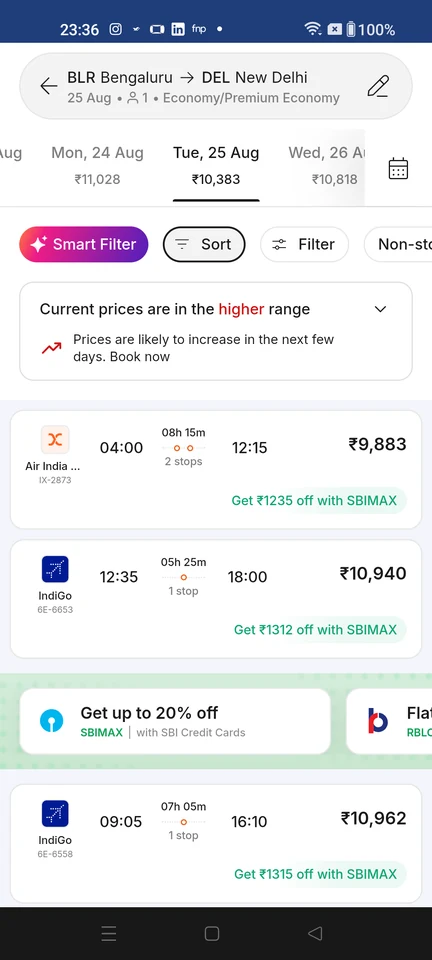
Search results · Top bar, Tabs, Filter control, Chip, Inline alert, Card
Step 4: Choose a fare
Step 5: Review flight details
Step 6: Decline trip protection
Step 7: Skip optional add-ons
Step 8: Add traveller details
Step 9: Review contact details
Step 10: Confirm trip details
Step 11: Choose a payment method